









The Rise of AI in Gaming & 3D Development
 Mar 30,2026
  By Rahul Pandit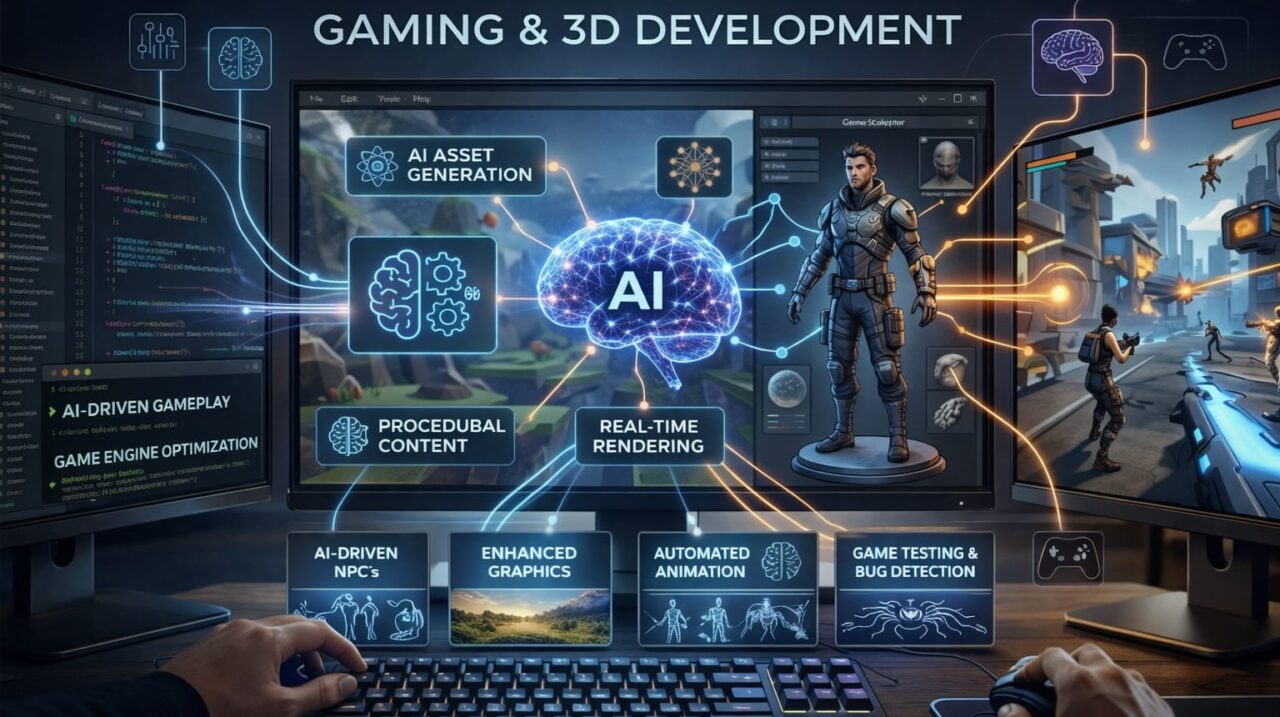
Video games are no longer just “games.” They are immersive experiences, virtual economies, and powerful marketing channels. At the same time, 3D development is rapidly shifting from niche studios to mainstream SaaS products, e‑commerce previews, industrial simulations, and metaverse platforms.
Behind this transformation is one force: AI in gaming and 3D development.
If you’re a startup founder, CTO, or product manager, you’re already facing a critical question:
Do you harness AI‑powered tools to build faster, richer 3D and gaming experiences, or let competitors do it first?
Industry Insight & Market Stats
The numbers speak for themselves:
- The global gaming market is projected to exceed USD 250 billion by 2028.
- The global 3D rendering and modeling market is expected to grow at over 15% CAGR, driven by gaming, AR/VR, and product visualization.
- According to recent reports, AI‑driven content creation is set to reduce development time for 3D assets by up to 40–60% in some studios.
In parallel, generative AI is reshaping how teams design characters, environments, textures, animations, and even dialogue. Startups and enterprises that integrate AI into their 3D and gaming pipelines are gaining a powerful edge in speed, innovation, and cost efficiency.
Detailed Explanation of the Topic
AI in gaming and 3D development isn’t just about making “smart NPCs.” It’s about three core shifts:
- Content Generation
Generative models (vision, text‑to‑3D, diffusion, etc.) can auto‑generate textures, concept art, basic 3D models, and even shader code from simple prompts or reference images. - Animation & Behavior
Reinforcement learning and neural networks power NPCs that react dynamically to players, creating more realistic and adaptive gameplay and simulations. - Pipeline Optimization
AI‑assisted tools automate repetitive tasks such as rigging, UV unwrapping, level‑of‑detail (LOD) generation, and bug‑prone QA workflows in 3D pipelines.
For product teams, this means:
- Faster prototyping of 3D dashboards, AR filters, and virtual product previews.
- Cheaper, faster content creation for web and mobile apps.
- More adaptive experiences for customers (configurable avatars, personalized environments, AI‑driven tutorials).
Benefits for Businesses
For startups and enterprises, integrating AI into gaming and 3D development unlocks several strategic advantages:
- Faster Time‑to‑Market
AI‑generated assets reduce manual modeling and design work, compressing cycles from weeks to days. - Lower Development Costs
Automated processes cut down on labor‑intensive modeling and animation tasks without sacrificing quality. - Richer User Experiences
AI‑driven personalization (adaptive enemies, tailored tutorials, dynamic environments) keeps users engaged longer. - Scalability for Product Suites
AI‑pipeline‑based 3D assets can be reused across web, mobile, and VR/AR surfaces, enabling unified experiential product strategies. - Future‑Proof Positioning
Teams that master AI‑assisted 3D and gaming early are better prepared for AR/VR marketplaces, metaverse projects, and immersive commerce.
If you’re planning to build something similar—whether it’s an AI‑powered 3D configurator, a web‑based game studio, or an immersive training platform—our team can help architect a scalable, cloud‑native solution.
Real‑World Use Cases
Several real‑world applications showcase the power of AI in this space:
- E‑commerce Product Visualization
Auto‑generate 3D models of products from a few reference photos and let users spin, zoom, and customize them in real time on the web or mobile. - Educational & Training Simulations
AI‑driven scenarios adapt to learner choices in medical, aviation, or industrial training environments, making simulations more realistic and measurable. - Metaverse & Virtual Worlds
AI populates environments with NPCs, generates dynamic terrain and textures, and personalizes avatars based on user data or preferences. - Game Development Studios
Indie and mid‑sized studios use AI for rapid prototyping of characters, environments, and animations, keeping production costs under control while experimenting with narrative variations. - Digital Twins & Industrial Visualization
Generative AI can convert 2D CAD or scan data into interactive 3D models optimized for web, mobile, or AR viewers.
Technology Stack Examples
Modern AI‑driven gaming and 3D projects often combine several key technologies:
- AI / LLM / ML Frameworks
- PyTorch, TensorFlow, Hugging Face for training and deploying models.
- Custom or pre‑trained diffusion models for image‑to‑3D or text‑to‑3D generation.
- Reinforcement learning libraries for NPC behavior.
- 3D Engines & Game Frameworks
- Unity or Unreal Engine for real‑time 3D and game logic.
- Web‑based 3D libraries such as Three.js, Babylon.js, or PlayCanvas for browser‑based experiences.
- Frontend & Mobile
- React (web) and Flutter (mobile) for cross‑platform UIs that integrate 3D viewers or in‑game UI.
- WebGL/WebGPU for high‑performance rendering.
- Backend & APIs
- FastAPI or Node.js for REST/WebSocket APIs that serve AI models, game state, and 3D assets.
- GraphQL for flexible data fetching in complex 3D dashboards or game backends.
- Cloud & Infrastructure
- AWS (S3, EC2, Lambda, ECS, EKS) or equivalent for scalable storage, compute, and containerized workloads.
- GPU‑accelerated instances for AI training and rendering farms.
- DevOps & Observability
- Docker, Kubernetes, CI/CD pipelines for automated testing and deployment.
- Monitoring tools (e.g., Prometheus, Grafana, Sentry) for AI and game performance.
If you’re building an AI‑driven 3D or gaming product, we offer end‑to‑end development from idea to deployment, helping you choose the right mix of React, Flutter, FastAPI, and cloud infrastructure for your use case.
Step‑By‑Step Development Approach
Here’s a practical roadmap for incorporating AI into your gaming or 3D project:
- Define the Core Use Case
- Is it a game, a 3D product configurator, an AR/VR application, or a training simulation?
- Identify where AI can add the most value (content generation, behavior, or optimization).
- Audit Existing Workflows
- Map your current 3D/art pipeline and identify bottlenecks (modeling, texturing, animation, QA).
- Prioritize tasks that are repetitive and rule‑based.
- Choose the Right AI Tools
- Use pre‑trained models where possible (image‑to‑3D, text‑to‑3D, style transfer).
- Fine‑tune or train custom models only if you have unique domain‑specific requirements.
- Design the Integration Layer
- Build APIs that accept inputs (text prompts, images, CAD files) and return 3D assets or behaviors.
- Ensure latency and quality are acceptable for your target platform (web, mobile, or console).
- Build a Prototype in Weeks, Not Months
- Start with a minimal 3D scene or game loop enhanced by a single AI feature (e.g., auto‑generated textures or NPC behavior).
- Gather user feedback early and iterate.
- Optimize for Scale and Performance
- Use cloud GPU clusters for heavy AI tasks.
- Implement caching, LODs, and asset‑bundle strategies to keep client‑side performance smooth.
- Plan for Continuous Improvement
- Feed user data (anonymized and compliant) back into AI models to improve behavior and content quality over time.
- Maintain a clear roadmap that balances innovation with technical debt.
If you’d like help structuring this for your specific product, you can Schedule a Free Consultation to explore architectural options and timelines.
Common Mistakes to Avoid
Teams that fail to see AI as a “plug‑and‑play” miracle often fall into predictable traps:
- Over‑Reliance on AI without Control
Auto‑generated assets can be inconsistent or low‑quality. Always keep human‑in‑the‑loop approval and editing workflows. - Ignoring Technical Debt
Rapid AI prototyping can leave messy, unscalable code once you move to production. Invest early in clean APIs, data schemas, and monitoring. - Underestimating Data Quality
AI models are only as good as the data they’re trained on. Poor training data leads to artifacts, bugs, and biased behaviors. - Neglecting Platform Constraints
High‑resolution 3D models optimized for desktop may kill mobile or web performance. Always design for your target device and browser. - Skipping User‑Centric Testing
Cool AI features don’t matter if they confuse or frustrate users. Test NPC behavior, UI changes, and interactive 3D flows with real users early.
Future Trends
Looking ahead, several AI‑driven trends will shape the next generation of gaming and 3D:
- AI‑First Game Engines
Engines that embed AI tools natively for level design, character creation, and behavior tuning. - Generative 3D for SaaS Products
Software products increasingly include 3D dashboards or configurators powered by generative 3D, reducing the need for custom 3D modeling. - Hyper‑Personalized Experiences
AI will dynamically adapt environments, challenges, and guidance based on user behavior, preferences, and even emotional signals (via multimodal models). - Real‑Time Collaboration & Cloud‑Based Workflows
Designers, developers, and AI tools will collaborate in real time on shared cloud‑based 3D workspaces, accelerating feedback loops. - Scalable SaaS Platforms for 3D & Gaming Assets
Platforms offering “AI‑assisted 3D asset stores,” where teams can generate, customize, and integrate 3D content directly into web or mobile apps.
As AI, automation, and SaaS scalability continue to converge, businesses that learn to leverage AI‑assisted 3D and gaming will define the next wave of immersive digital products.
Strong Conclusion
AI in gaming and 3D development is no longer optional; it’s a strategic lever for speed, cost, and creativity. Whether you’re an enterprise exploring immersive training, a startup building a 3D‑heavy SaaS product, or a product manager envisioning the next web‑based game engine, now is the time to design with AI‑assisted workflows in mind.
If you’re evaluating how to integrate AI into your gaming or 3D roadmap, we invite you to Talk to Our Experts. We help teams architect AI‑driven 3D and gaming experiences built on React, Flutter, FastAPI, and AWS‑like stacks, ensuring your product scales as your ambitions grow.
Book a free strategy meeting to discuss your requirements and turn your vision into a production‑ready roadmap.
FAQ Section
1. How is AI used in gaming?
AI is used for NPC behavior, content generation, personalization, and game testing.
2. What are the benefits of AI in 3D development?
AI automates modeling, animation, and rendering, reducing development time and costs.
3. Which tools are used for AI game development?
Popular tools include Unity, Unreal Engine, TensorFlow, and PyTorch.
4. Can startups use AI in gaming?
Yes, AI helps startups build innovative and scalable gaming solutions.
5. What is the future of AI in gaming?
The future includes generative worlds, AI-driven design, and immersive metaverse experiences.


 Apr 02, 2026

